
Vertical-Drama Apps May Spend Coins Without a Second Tap
ReelShort, DramaBox, ShortMax and GoodShort do not clearly promise a confirmation before every episode unlock. Check auto-unlock, coin records and device purchase controls before a fast binge.
Streaming · August 11, 2026 · 8 min read
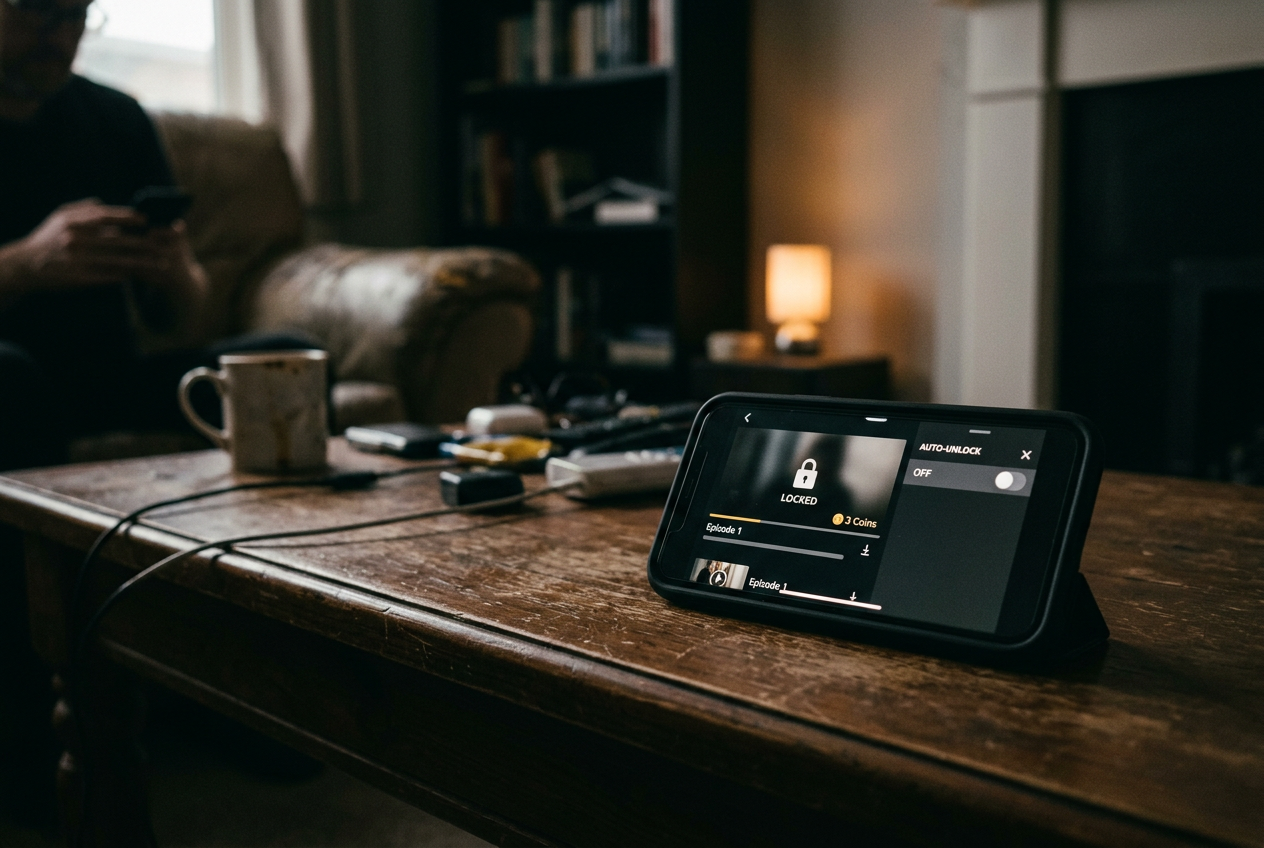
The risky moment is the first locked episode after a cliffhanger. A character opens the door, recognizes somebody the script has withheld for six minutes, and the app replaces the next scene with an Unlock button carrying a coin price. One tap may open a confirmation sheet. It may also spend the coins already sitting in the account.
That distinction matters more than the price printed on the button. ReelShort, DramaBox, ShortMax and GoodShort sell or distribute virtual coins that can unlock episodes, but their public consumer documentation does not provide a dependable, universal promise that every individual unlock requires a second tap. Interfaces also change by phone, app version and account state. None earns a clean “always confirms” label on documentation alone.
This is streaming coverage, specifically mobile viewing, because the practical decision is whether the app can be left ready to play without leaving its stored coin balance equally ready to spend.
Purchase approval and coin approval are different
A coin paywall is a gate that charges virtual currency to continue a series. Buying a coin pack and spending those coins are separate transactions, even when they happen less than a minute apart.
Apple’s App Store or Google Play can require authentication when the user buys the pack. Face ID, a password or a family approval prompt protects that store transaction. Once the coins reach the vertical-drama account, however, an episode unlock usually happens inside the app’s own economy, where the operating system may have nothing further to approve.
This produces the misleading version of safety: the phone asks for a password when $10 worth of coins enters the account, then the app can deduct that stored balance episode by episode without returning to Apple or Google. A parent may see no new card charge while a child empties coins bought earlier. A fast-moving adult can do the same thing, with better reading skills and roughly equal resistance to cliffhangers.
The first locked episode is therefore the right checkpoint. Do not start by buying the smallest pack “just to see” how confirmation works. First inspect the locked screen, the player settings and the account area; if the app offers free or promotional coins, those can reveal the ledger’s behavior without creating a new store charge, though tapping Unlock may still consume them immediately.
The four-app comparison has no automatic winner
The useful comparison is not whether each app has an Unlock button. They do. It is whether the app publicly guarantees a pause after that button, whether it can continue unlocking episodes during autoplay, and whether the account shows where coins went rather than merely where they came from.
| App | Confirmation before each coin unlock | Auto-unlock check | History check | |---|---|---|---| | ReelShort | No clear universal guarantee in public consumer documentation | Inspect the locked-episode screen, player controls and account settings before playback | Look for coin, wallet or transaction records inside the account; App Store or Play history covers coin purchases, not necessarily episode deductions | | DramaBox | No clear universal guarantee in public consumer documentation | Check the paywall and profile settings for automatic unlocking or continuous-play language | Confirm that any in-app record identifies deductions, not only top-ups and rewards | | ShortMax | No clear universal guarantee in public consumer documentation | Inspect settings before reaching the first paid episode | Compare the visible balance with any coin record; device billing history alone is incomplete | | GoodShort | No clear universal guarantee in public consumer documentation | Check the unlock panel and playback settings rather than assuming autoplay is free | Find an internal wallet or coin ledger before loading a paid balance |
This does not mean all four interfaces behave identically. It means the safety claim a reader would need, “every paid episode requires an explicit second confirmation,” is not established consistently enough in public documentation to trust across devices and versions. The absence of a documented promise is the result that matters here.
A confirmation sheet should state the episode being opened, the number of coins deducted and the action that completes the spend. A button that already says “Unlock for 50 coins” may itself be treated as consent, rather than as the opening move in a two-step exchange. If the surrounding copy does not promise another review screen, assume the tap can be final.
Autoplay can turn one decision into several
Autoplay, meaning playback that advances without another manual selection, is mostly harmless while episodes remain free. It becomes a billing control when the app reaches locked chapters.
Look for labels such as Auto Unlock, Automatically Unlock Next Episode, Continuous Unlock or an equivalent switch near the paywall, player menu or profile settings. The exact wording and location can move. Turn the control off before beginning a paid run, then close and reopen the app to check that the choice persisted. A switch that resets after an update or sign-in is not much of a switch.
Also read the consent text around any discounted bundle or “unlock more” offer. An app can frame a batch unlock as convenience, which it is, while making the number of episodes and total coin deduction easier to skim than the latest betrayal. Batch purchases should be treated as their own format choice: they reduce interruptions, but they also remove the natural stopping points that reveal how quickly the balance is falling.
Return to the first locked episode after changing the setting. The desired behavior is dull: playback stops, the coin cost remains visible, and nothing advances until the user makes a fresh choice. Dull is excellent here.
Purchase history is only half a history
Apple and Google maintain records of store purchases. Those records can show that a coin pack was bought through the platform, subject to the account and payment setup. They generally cannot explain which internal episodes consumed the resulting virtual balance, because that deduction takes place within the drama app rather than as a new store purchase.
For that, the app needs an internal ledger. Search the profile or wallet area for Coins, Balance, Records, Transactions, Consumption or History. A useful ledger separates purchased coins from bonus coins, records deductions, and gives enough episode or series information to identify the spend. A page showing only the current total is a balance display, not an audit trail.
Before paying, take a screenshot of the balance and the first locked episode’s stated cost. After using a free reward unlock, if one is available and expendable, compare the new balance and inspect the record. This is not a full test of every future screen, but it establishes whether deductions can be reconstructed without buying a pack solely for research.
If no internal history is visible, treat the loaded balance like cash placed beside the player. Keep it small, avoid batch unlocks and do not expect the App Store or Play Store receipt to explain a string of episode-level deductions later.
Lock the store before lending the phone
Device controls cannot reliably stop coins already held inside an app, but they can block or slow the purchase of more.
On an iPhone or iPad, Screen Time includes controls for in-app purchases under Content & Privacy Restrictions. Apple’s family features can also require approval for a child’s purchases, depending on the family and account setup. Check Apple’s current instructions for the installed software version, then verify the restriction with the child’s account rather than the organizer’s.
On Android, Google Play offers purchase authentication settings, while Family Link can apply approval controls to supervised accounts. The menu path and available choices can vary by device, account and region, so the important test is whether a store transaction demands authentication every time the relevant user attempts one.
Neither system substitutes for disabling auto-unlock. Store authentication guards the door where money becomes coins; the app’s settings govern what happens after the coins are inside.
For a phone being handed to a child, the safer setup is an empty or deliberately limited app balance, auto-unlock off, store purchases restricted and the account’s coin history located in advance. Removing a saved payment method may add friction, but it does not erase coins already credited to the account.
A five-minute check before the binge
Open the series and advance only as far as the first locked episode. Record the displayed coin cost without tapping the unlock control.
Next, search the player and profile settings for automatic unlocking, continuous playback through paid episodes, or batch-unlock preferences. Disable them. Reopen the app and confirm the setting held.
Find the internal coin record before adding funds. If the account exposes only a balance, decide whether that limited visibility is acceptable; for a child’s device, it should count against leaving any stored coins at all.
Then review the phone’s App Store or Play Store authentication. This protects new purchases, not internal spending, but both controls are needed because they cover different parts of the transaction.
Finally, return to that first locked episode. Unless the screen explicitly says a review step follows, treat the Unlock button as the final spend. The app may confirm. Your budget should not depend on it.
Questions people ask
Does
Face ID stop a child from spending coins already in the app?
Usually not by itself. Face ID can authenticate an App Store purchase, but an episode unlock paid from an existing virtual balance happens inside the app. Keep the balance empty or limited, disable auto-unlock and locate the app’s internal coin history before handing over the phone.
Can
App Store or Google Play history show which episodes were unlocked?
Store history can document the purchase of a coin pack, but it may not show how those coins were later divided among episodes. Look inside the vertical-drama app for a wallet, transaction or consumption record that lists deductions and identifies the relevant series or episode.
Is tapping
Unlock safe if the app displays a coin price?
Do not assume another screen follows. A button labeled with the coin amount may itself communicate the cost and complete the deduction in one tap. If the interface does not explicitly promise confirmation, stop there until auto-unlock is off and the account’s transaction record is visible.
Which vertical-drama app has the safest confirmation system?
ReelShort, DramaBox, ShortMax and GoodShort do not provide a sufficiently clear, universal public guarantee of confirmation before every episode-level coin spend. Interface behavior may vary, so choose based on the installed version’s auto-unlock control, internal deduction history and how little prepaid balance you need to keep.
One update a day
Today's review, in your inbox
One review each morning — no hype, no filler, just what is worth watching.


