
Micro-Drama Apps Don’t Promise a Warning Before Coin Unlocks
ReelShort, DramaBox, ShortMax, GoodShort and FlexTV explain coins, but their public documentation does not guarantee a confirmation before every episode charge.
Streaming · August 11, 2026 · 8 min read
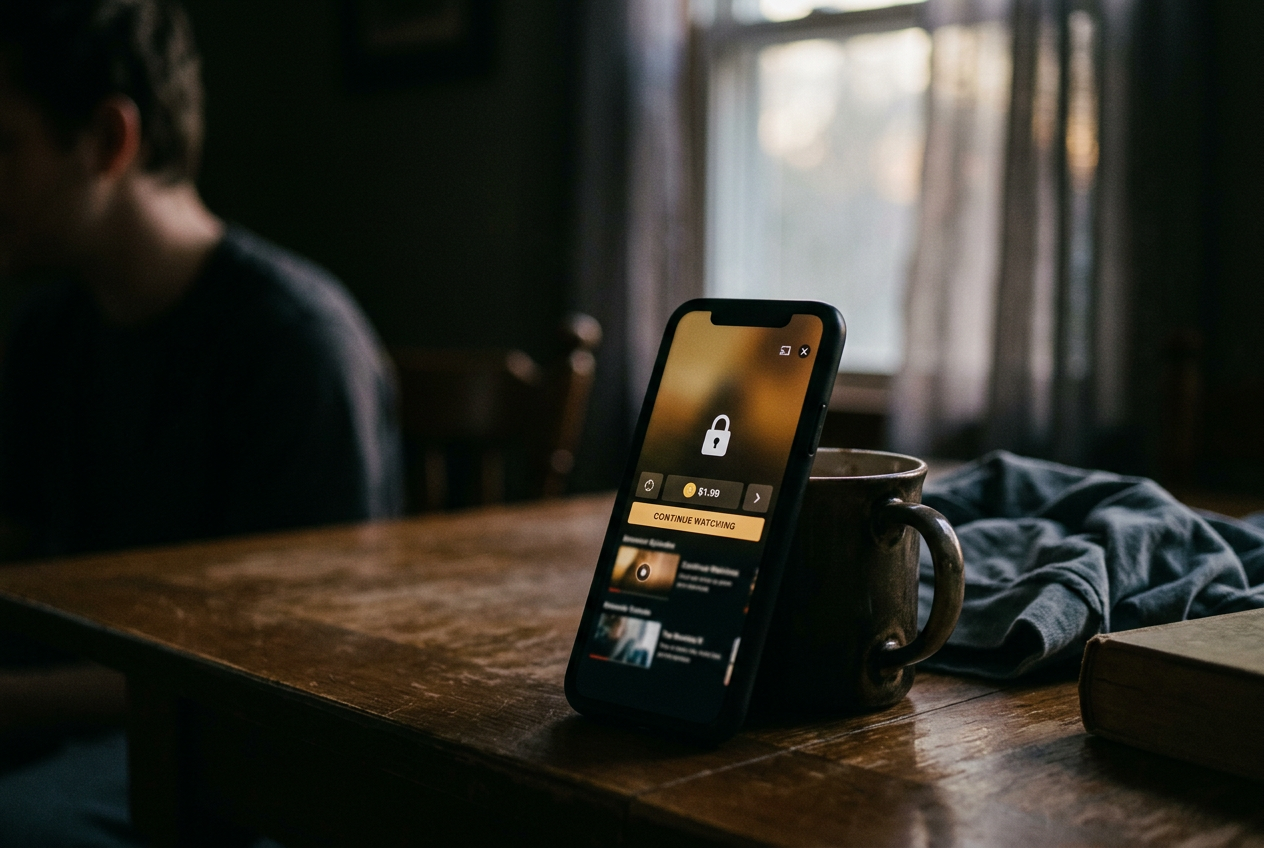
This is streaming coverage, specifically the phone-sized corner where a micro-drama, meaning a vertical series told in one-to-two-minute episodes, can move from free viewing to paid unlocking between two lines of dialogue. There are no story spoilers here. The relevant cliffhanger is the interface.
The concrete checkpoint is easy to recognize: an episode ends, the final frame shrinks or disappears, and a padlocked next-episode card appears with a coin price, a play button or a countdown. That screen is where viewers need friction. Public terms and help materials from ReelShort, DramaBox, ShortMax, GoodShort and FlexTV describe virtual currencies and paid content, but they do not provide a durable, version-independent promise that every tap from that card produces a second confirmation before coins leave the balance.
That does not prove every unlock is immediate. It means none of those apps can be placed confidently in an “always confirms” column from public documentation alone, especially when interfaces can vary by operating system, app version, region and account settings. For practical purposes, treat all five as unconfirmed until the exact build on your phone demonstrates otherwise.
Buying coins and spending coins are separate events
A coin purchase adds virtual currency to an account. An episode unlock spends some of that currency inside the app. Those actions may sit only seconds apart, but the safeguards are different.
Apple or Google can request a password, biometric check or store-level approval when real money buys a coin bundle. That authentication belongs to the platform billing step. Once the coins exist, tapping a locked episode may count as an internal redemption rather than another store purchase, so the operating system does not necessarily return to ask whether the viewer meant to spend them.
This distinction explains why a viewer can remember approving one payment and still be surprised by several later unlocks. The app has not necessarily charged the card several times. It may have drawn down a balance that was already purchased, earned through ads or assembled from bonuses. The practical loss is still real within the app, because spent coins may be subject to different refund rules from an unauthorized cash transaction.
Brand documentation usually concentrates on how virtual currency works, what paid content includes and whether coins expire, transfer or qualify for refunds. That is useful legal plumbing. It rarely maps the taps after a cliffhanger, which is the point at which a viewer needs to know whether “continue” means preview, confirmation or completed unlock.
The audit result for the major coin apps
ReelShort, DramaBox, ShortMax, GoodShort and FlexTV all belong in the same cautious category for this narrow question: their public-facing documentation does not guarantee a confirmation screen before every coin-funded episode unlock. A guarantee would need plain language saying that the app displays the episode price and requires a separate approval for each redemption, including during autoplay. General references to authorizing purchases do not settle that narrower behavior.
The absence matters because these apps are built around pace. A short episode reaches its turn, withholds the answer and directs attention toward the next installment before the viewer has mentally left the scene. Autoplay, meaning the automatic start of the following episode, can shorten the gap further; an auto-unlock option can remove it almost entirely if enabled.
This is not a claim that every named app silently spends coins on every phone. Some versions may show a price button, some accounts may receive a prompt, and some titles may pause at a locked card until the viewer chooses an earning or payment route. The usable finding is narrower and less exciting: documentation cannot be treated as a reliable safety rail, so the app’s live behavior and settings have to be checked before a balance is loaded.
That padlocked next-episode card is the test. If the first active control says “unlock” alongside a coin amount, assume the tap may authorize the spend. If it says “next” or displays only a play symbol, do not infer that another warning must follow. Interface labels are instructions, not decorative suspense.
Count the taps before the cliffhanger counts for you
A clean audit starts with no large prepaid balance. Open a series that has not already been unlocked, enter the playback settings and look for labels such as auto-unlock, automatic purchase, autoplay or continuous play. These controls are not interchangeable: autoplay can advance through free episodes without authorizing paid ones, while auto-unlock can describe permission to spend coins when playback reaches a lock.
Disable any setting that mentions automatic unlocking or purchasing. Autoplay can stay on for the first pass if the aim is to observe where it stops, but switch it off when the language is ambiguous. A control that promises uninterrupted viewing is pleasant until “uninterrupted” includes a currency decision.
Then follow one free episode to its last frame without touching the screen. Record whether the app stops, starts a countdown, opens a purchase sheet or advances directly. At the locked card, note the displayed coin price and every active button before tapping anything. Screen recording can preserve the sequence, although account information and notifications should be hidden before sharing it.
The decisive count begins there. Tap once. If a new screen repeats the episode number and coin price, and a second control must be pressed to approve, the app has provided an episode-level confirmation in that specific test. If the first tap opens the episode and reduces the balance, it has not.
If a countdown completes the unlock without another action, autoplay or auto-unlock has supplied the missing tap on the viewer’s behalf.
Repeat the test after closing and reopening the app, because a prompt may include a “do not ask again” choice or behave differently once a first unlock has been accepted. Also inspect a different series before generalizing. Some apps price titles or episodes differently, and a familiar continuation screen can conceal a changed amount.
This sounds fussy. It takes less time than a few episodes, which in this format is not saying much.
The confirmation screen should repeat the actual decision
A useful confirmation names the episode, shows the coin cost, displays the balance and requires a separate affirmative action. A generic “continue watching” prompt does not do the same job, particularly when it appears during a countdown or beside a prominent play symbol.
The best alternative would make paid continuation visibly different from free continuation. Autoplay could run through unlocked episodes, stop at the padlocked card and offer separate controls to spend coins, watch an ad when available or leave playback. A persistent setting could allow automatic unlocking, but it should state the spending rule before activation and remain easy to reverse.
The weaker design compresses those choices. It places the currency amount near a continuation button, relies on a previously accepted setting or treats one tap as both navigation and authorization. That may be efficient for the app. It is less useful to someone watching one-handed while the cliffhanger is still doing its job.
Return to the padlocked card after changing any setting. If the card now pauses and names the cost, the toggle mattered. If the next episode still opens on the first tap, there is no confirmation layer to rely on, whatever the broader purchase terms say.
Reduce unintended unlocks without abandoning the series
Keep only a small coin balance when trying a new app or title. This is not financial advice; it is a way to limit how many episodes an unclear setting can unlock before the behavior becomes obvious. Coins earned through ads deserve the same attention, since an unintended redemption can erase viewing time even when no new cash leaves the account.
Avoid the largest bundle until the unlock path is understood. Bundle bonuses can make the per-coin price look better while increasing the amount exposed to one-tap continuation, and a cheaper unit is not much comfort when the app spends units faster than expected.
Check the account or transaction history after the first paid episode. A useful history identifies the title, episode and coin amount. If it shows only a changing balance or grouped activity, take a screenshot of the locked card before proceeding. That record makes it easier to distinguish an episode redemption from a new store purchase if support needs to review the account.
Parental controls and platform purchase verification can restrict fresh cash purchases, but they should not be described as universal controls on coins already inside an account. The safer assumption remains simple: once virtual currency has arrived, the micro-drama app governs how it is spent.
The audit therefore ends where it began, on the card after the cliffhanger. Read the price. Read the button. If those two elements do not make the consequence of one tap plain, back out rather than testing the wording with a large balance.
Questions people ask
Which micro-drama apps always confirm before spending coins?
None of ReelShort, DramaBox, ShortMax, GoodShort or FlexTV can be certified as always confirming from their public documentation. A particular version may show a second prompt, but viewers should verify that behavior on the current device, account and title before treating it as a standing safeguard.
Does
Face ID or a Google Play password protect every episode unlock?
Usually, that verification applies when real money buys a coin bundle through the platform store. Spending coins already held inside an app is a separate internal action, so an episode can unlock without returning to Apple or Google for another biometric or password check.
Should autoplay be turned off on micro-drama apps?
Turn it off while auditing an app, especially if the settings also mention automatic unlocking, continuous viewing or automatic purchases. Once the padlocked next-episode card has been tested and paid episodes reliably pause for a clear choice, ordinary autoplay through free or previously unlocked episodes carries less risk.
Can spent coins be refunded after an accidental unlock?
Refund treatment depends on the app’s current terms, the platform involved and the transaction type. Save the episode number, displayed price, balance history and any relevant settings, then use the app’s support channel promptly; do not assume a store refund process covers virtual currency already redeemed inside the app.
One update a day
Today's review, in your inbox
One review each morning — no hype, no filler, just what is worth watching.


